
PIC18F4580 – Switch Interfacing
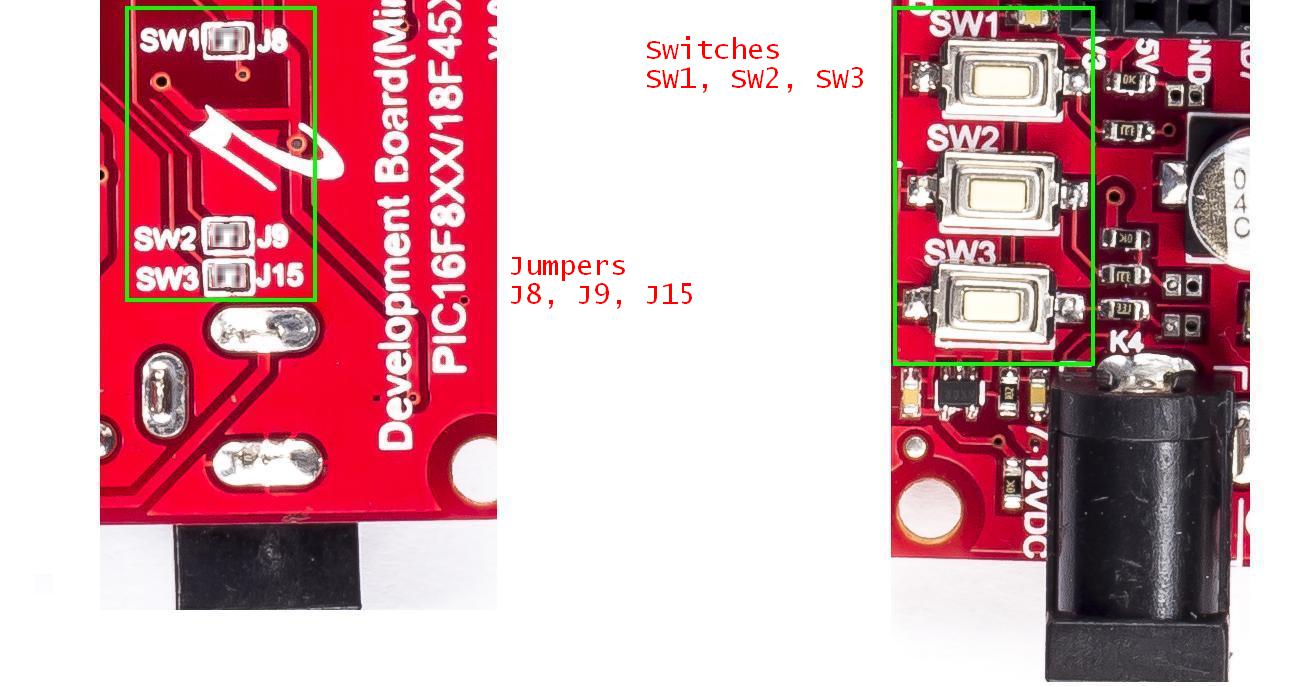
PIC18F4580 Mini Development Board has 3 Switches (SW1,SW2 & SW3) connected to port pins RC3, RC2 & RB5 via jumpers J8, J9 & J15 respectively. These switches are externally pulled up to +5V. On shorting these jumpers, the switches can be used as pull_up keys and if the jumpers are left open, then the port pins can be used independently.
Schematic

Note: To use the pull-up keys, don’t forget to short the jumpers J8, J9 & J15. Leaving them open frees RC3, RC2 & RB5 and can be used for any other desired purpose.
Sample Code
Sample code to test the switches is given below. In the code, switch press is detected by polling and upon pressing a switch, its name gets displayed on the LCD.
|
1 2 3 4 5 6 7 8 9 10 11 12 13 14 15 16 17 18 19 20 21 22 23 24 25 26 27 28 29 30 31 32 33 34 35 36 37 38 39 40 41 42 43 44 45 46 47 48 49 50 51 52 53 54 55 56 57 58 59 60 61 62 63 64 65 66 67 68 69 70 71 72 73 74 75 76 77 78 79 80 81 82 83 84 85 86 87 88 89 90 91 92 93 94 95 96 97 98 99 100 101 102 103 104 105 106 107 108 109 110 111 112 113 114 115 116 117 118 |
/************************************************************************* HEADER FILE **************************************************************************/ #include<pic18.h> /************************************************************************* FUNCTION DECLARATIONS **************************************************************************/ void Delay_us(int us); void Data(int Value); void Cmd(int Value); void Send2LCD(const char Adr, const char *Lcd); /************************************************************************* MAIN FUNCTION **************************************************************************/ void main() { TRISC = 0X0C; /* RC1(EN),RC0(RS)->O/P,RC3(SW1),RC2(SW2)->I/P */ TRISD = 0X00; /* PORTD(LCD data lines) configured as output */ TRISB5 = 1; /* RB5 configured as i/p for SW3 */ Delay_us(25); Cmd(0X30); /* LCD Specification Commands */ Delay_us(25); Cmd(0X30); /* LCD Specification Commands */ Delay_us(25); Cmd(0X30); /* LCD Specification Commands */ Delay_us(25); Cmd(0X38); /* Double Line Display Cmd */ Cmd(0X06); /* Auto Increment Location Address Cmd */ Cmd(0X0C); /* Display ON Cmd */ Cmd(0X01); /* Clear Display Command */ Delay_us(1000); while(1) { if(RC3==0) /* If SW1 is pressed, RC3 gets low */ { Send2LCD(0x80,"SW1 PRESSED "); } else if(RC2==0) /* If SW2 is pressed, RC2 gets low */ { Send2LCD(0x80,"SW2 PRESSED "); } else if(RB5==0) /* If SW3 is pressed, RB5 gets low */ { Send2LCD(0x80,"SW3 PRESSED "); } else { Send2LCD(0x80,"NO SW PRESSED "); } } } /************************************************************************* * Function : Cmd * * * * Description : Function to send a command to LCD * * * * Parameters : Value - Command to be given * **************************************************************************/ void Cmd(int Value) { PORTD = Value; /* Write the command to data lines */ RC0 = 0; /* RC5=0(RS=0 for command Register Selection) */ RC1 = 1; /* RC1=1(Enable pin High) */ Delay_us(25); RC1 = 0; /* RC1=1(Enable pin Low) */ } /************************************************************************* * Function : Data * * * * Description : Function to display a character on LCD * * * * Parameters : Value - Character to be displayed * **************************************************************************/ void Data(int Value) { PORTD = Value; /* Write the character to data lines */ RC0 = 1; /* RC5=1(RS=1 for data Register Selection) */ RC1 = 1; /* RC1=1(Enable pin High) */ Delay_us(25); RC1 = 0; /* RC1=1(Enable pin Low) */ } /************************************************************************* * Function : Send2LCD * * * * Description : Function to send string of data to LCD * * * * Parameters : Adr, contains the adddress of a string * **************************************************************************/ void Send2LCD(const char Adr, const char *Lcd) { Cmd(Adr); /* Address of location to display string */ while(*Lcd!='\0') /* Check for termination character */ { Data(*Lcd); /* Display the character on LCD */ Lcd++; /* Increment the pointer */ } } /************************************************************************* * Function : Delay_us * * * * Description : Function for 1 microsecond delay * * * * Parameter : us - delay in microseconds * **************************************************************************/ void Delay_us(int us) { us=us>>1; while(us!=1) us--; } /*************************** END OF PROGRAM ****************************/ |
Topics related to PIC18F4580 Mini Development Board
- PIC18F4580 Mini Development Board – Overview
- PIC18F4580 Mini Development Board – Interfacing LED
- PIC18F4580 Mini Development Board – Interfacing LCD
- PIC18F4580 Mini Development Board – Serial communication(USART)
- PIC18F4580 Mini Development Board – Interfacing Switch
- PIC18F4580 Mini Development Board – Interfacing Buzzer
- PIC 18F4580 Mini Development Board – Interfacing POT(ADC)
- PIC18F4580 Mini Development Board – Interfacing Temperature sensor
- PIC18F4580 Mini Development Board – Interfacing Servo Motor
- PIC18F4580 Mini Development Board – Interfacing μRFID
- PIC18F4580 Mini Development Board – Interfacing CAN
Resources
- Datasheets
How to buy?
- Click here to buy rhydoLABZ PIC 16F877A Mini Development Board
- Click here to buy rhydoLABZ PIC 18F4520 Mini Development Board
- Click here to buy rhydoLABZ PIC 18F4550 Mini Development Board
- Click here to buy rhydoLABZ PIC 18F4580 Mini Development Board
Support Please share your ideas with us, visit our forum for discussion
Leave a Reply
You must be logged in to post a comment.